Tuesday, September 9, 2014

ADF sample Applications

Please refer to this for sample adf applications:-
https://java.net/projects/smuenchadf/pages/ADFSamples

Wednesday, August 13, 2014

Problem not fetching all the records when executing a View Object in ADF

Execute the View Object :

this.getXyzEOView().getViewObject().setQueryMode(ViewObjectImpl.QUERY_MODE_SCAN_DATABASE_TABLES|ViewObjectImpl.QUERY_MODE_SCAN_ENTITY_ROWS|ViewObjectImpl.QUERY_MODE_SCAN_UNPOSTED_ENTITY_ROWS|ViewObjectImpl.QUERY_MODE_SCAN_VIEW_ROWS);

Thursday, July 17, 2014

Run the page after rebuilt in adf

Replace the target in the jdeveloper properties with the below line:


C:\Oracle\Middleware-New\jdeveloper\jdeveloper.exe -J-Doracle.jdeveloper.adrs.incr.buildMonitor=false

Monday, June 16, 2014

ADF Best Practices

ADF Best Practices:
1.        Avoid Web services -- performance issues.
2.        Avoid JDBC Raw calls – framework already takes care of that
3.        Resource bundles – Error messages, tooltips and labels
4.        UI Properties files – File of tokens and matching strings
5.        Clean check out – everytime when starting a development
6.        One to Many mapping of EO s and VO s – Using joins in VO s is preferable
7.        Use ROVO when possible – Helps performance by bypassing the entity cache
8.        Define VO s at design time rather than at run time – VO s created at run time will incur an overhead in the performance
9.        Use named bind variables in queries to filter the data based on a number of parameters – Can use executeWithParams as a search form
10.     Performance – Define how many and what matter the rows are being fetched
                        Optimizer hints
                        Define the query plan the DB will use when executing a query

                            
11.     Application Module Configuration setting:

a.        While Developing : ‘jbo.ampool.doampooling’ parameter to ‘false’
As you exit out your application while testing, re-runs of the application wont be locked by the application you just exited.
b.        While Testing : ‘jbo.dofailover’ parameter to ‘false’
Thus disabling application fail over. This will allow application with out having to save the failover information.
c.        If the application uses the same database user to access application data ensure that you are not running with dynamic JDBC credentials. Use ‘jbo.ampool.dynamicjdbccredentials’ set to ‘false’

12.     Java Server Faces:
Do not mix JSFs with any other raw HTML tables for layout.

13.     Backing Beans:
The backing bean is a one-stop-shop for the code associated with a web page and generally speaking it is good practice,  if you require code to support a page, to have one backing bean per page.

14.     Managed Beans:

If it is required to store the state information to be held for the user interface then this should be done through managed beans.ADF Best Practices:
1.        Avoid Web services -- performance issues.
2.        Avoid JDBC Raw calls – framework already takes care of that
3.        Resource bundles – Error messages, tooltips and labels
4.        UI Properties files – File of tokens and matching strings
5.        Clean check out – everytime when starting a development
6.        One to Many mapping of EO s and VO s – Using joins in VO s is preferable
7.        Use ROVO when possible – Helps performance by bypassing the entity cache
8.        Define VO s at design time rather than at run time – VO s created at run time will incur an overhead in the performance
9.        Use named bind variables in queries to filter the data based on a number of parameters – Can use executeWithParams as a search form
10.     Performance – Define how many and what matter the rows are being fetched
                           Optimizer hints
                               Define the query plan the DB will use when executing a query
                            
11.     Application Module Configuration setting:
a.        While Developing : ‘jbo.ampool.doampooling’ parameter to ‘false’
As you exit out your application while testing, re-runs of the application wont be locked by the application you just exited.
b.        While Testing : ‘jbo.dofailover’ parameter to ‘false’
Thus disabling application fail over. This will allow application with out having to save the failover information.
c.        If the application uses the same database user to access application data ensure that you are not running with dynamic JDBC credentials. Use ‘jbo.ampool.dynamicjdbccredentials’ set to ‘false’

12.     Java Server Faces:
Do not mix JSFs with any other raw HTML tables for layout.

13.     Backing Beans:
The backing bean is a one-stop-shop for the code associated with a web page and generally speaking it is good practice,  if you require code to support a page, to have one backing bean per page.

14.     Managed Beans:
If it is required to store the state information to be held for the user interface then this should be done through managed beans.

Thursday, May 15, 2014

Refresh Page in ADF

The following code refreshes the whole page

  1. FacesContext fctx = FacesContext.getCurrentInstance();
    String refreshpage = fctx.getViewRoot().getViewId();ViewHandler ViewH = fctx.getApplication().getViewHandler();
    UIViewRoot UIV = ViewH.createView(fctx, refreshpage);
    UIV.setViewId(refreshpage);
    fctx.setViewRoot(UIV);

To refresh a specific component :

  1. AdfFacesContext.getCurrentInstance().addPartialTarget(UIComponent);

Friday, May 9, 2014

Web Service Proxy in adf

Requirement : Create a web service proxy and use that to invoke the web service and get the response.

As per my understanding web service proxy created java classes that can be used to invoke the web service from the application.

Creating a web service proxy is pretty simple, we just need to have the wsdl url.

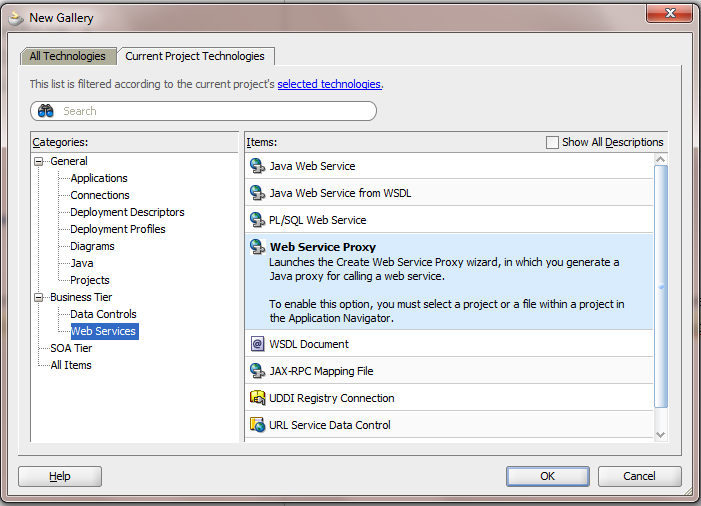
On 11.1.1.5.0 the options would be something like this:


select web service proxy

On 11.1.2.0


Now we need to select the different options in the wizard:

NOTE :  The Client style is usually JAX-WS Style but sometimes when invoking a .net service or any other legacy services we might encounter an error whil creating the web service. 

That case we might want to create a JAX-RPC weblogic style. 

In my case i had a .net service which i wasnt even able to test it in SOAPUI. This case go for JAX-RPC which will serve the purpose.

Please be informed that you can see these style selections only when we create a generic application with the web services shuffled in the project technologies, then you would see this option 

This new application can be used as a jar in the working application/project where you want to use the service.

For a regular SOA service we dont have to worry about all this. 

After successfully creating a Web Service Proxy we can see various .java files created. We have to search for class ending in *client.java class where you have the comments 

// add your code here 

Once we are aware of the input types pass the request and get the response here. 

If the request has to be sent from a different application, we need to add this application in the dependencies and class paths as a .jar file


Wednesday, May 7, 2014

Usage Of Servlets in ADF To Show Af:Image Based On a Parameter

Requirement : Show a Picture based on an Id which is coming from a service.

Solution : Create a Servlet in ViewController


Select appropriate methods to implement from doGet(), doPost(), service(), doPut(), doDelete().

In my case i had to implement the doGet() method to get the response from the servlet and show that on the jsff page.

The URL pattern will let you point to the appropriate Servlet from the page.

A java class something like this will get generated:

package client;

import java.io.IOException;
import java.io.PrintWriter;

import javax.servlet.*;
import javax.servlet.http.*;

public class Servlet1
  extends HttpServlet
{
  private static final String CONTENT_TYPE = "text/html; charset=windows-1252";

  public void init(ServletConfig config)
    throws ServletException
  {
    super.init(config);
  }

  public void doGet(HttpServletRequest request, HttpServletResponse response)
    throws ServletException, IOException
  {
    response.setContentType(CONTENT_TYPE);
    PrintWriter out = response.getWriter();
    out.println("<html>");
    out.println("<head><title>Servlet1</title></head>");
    out.println("<body>");
    out.println("<p>The servlet has received a GET. This is the reply.</p>");
    out.println("</body></html>");
    out.close();
  }
}

Override the doGet() method as per the requirement :
In my case i pass an Id to a service and get the byte[] in response to it.
I need to convert it to a jpg file, so set the content type to "image/jpg".
Write that to the out response of the doGet() and we are done defining and implementing the Servlet.

For Ex :

  public void doGet(HttpServletRequest request, HttpServletResponse response)
    throws ServletException, IOException
  {
    if (request.getParameter("dsId") != null)
    {
      OutputStream out = null;
      try
      {
        /*
          Code to get the Id from the service, added a jar file to the ViewController which has the webservice proxy client
          */
               }
        if (imageByte != null)
        {
          response.setContentType("image/jpg");
          out = response.getOutputStream();
          out.write(imageByte);
          out.flush();
        }
      }
      catch (Exception ex)
      {
        ex.printStackTrace();
      }
      finally
      {
        if (out != null)
          out.close();
      }
    }
  }
}

On the page where the image has to be showed on the run time give the appropriate Servlet URL

For Ex:

<af:image source="/dsimageservlet?dsId=#{bindings.DistributorId.inputValue}" id="i12"
                            inlineStyle="height:150px; width:150px;"/>

The newly added servlet can be view in web.xml file in my case the name is DSImageServlet.


Thats it, run the page and view the servlet response on the page.