Thursday, July 16, 2015

Formatting a String in Java

Below is an example how we can format a string in a java class:

StringBuilder stringBuilderMessage = new StringBuilder("<html><body>");        

String panelHeading = "Heading";
String panelMessage = " Hello ";

stringBuilderMessage .append("<p style='color:red'><b>"+panelHeading +"</b></p>");

stringBuilderMessage .append("<p>"+panelMessage +"<b>");
stringBuilderMessage .append("</body></html>");

String formatedMessage = stringBuilderMessage.toString(); 

this.addFacesMessageWithMessageText(formatedMessage, FacesMessage.SEVERITY_INFO, null);

    public static void addFacesMessageWithMessageText(String messageTxt, FacesMessage.Severity severity,
                                                      UIComponent component) {
        FacesContext fcontxt = FacesContext.getCurrentInstance();
        FacesMessage fm = new FacesMessage(severity, "", messageTxt);
        if (component == null) {
            fcontxt.addMessage(null, fm);
        } else {
            fcontxt.addMessage(component.getClientId(), fm);
        }
    }

Wednesday, May 20, 2015

Difference between RESTful and SOAP web services

Simple Object Access Protocol (SOAP) and REpresentational State Transfer (REST) are two different ways to access a web service.

SOAP is a standards-based Web services access protocol that has been around for a while and enjoys all of the benefits of long-term use. Originally developed by Microsoft, SOAP really isn’t as simple as the acronym would suggest.

REST is the newcomer to the block. It seeks to fix the problems with SOAP and provide a truly simple method of accessing Web services. However, sometimes SOAP is actually easier to use; sometimes REST has problems of its own. Both techniques have issues to consider when deciding which protocol to use.

SOAP and REST share similarities over the HTTP protocol, SOAP is a more rigid set of messaging patterns than REST. The rules in SOAP are important because without these rules, you can’t achieve any level of standardization. REST as an architecture style does not require processing and is naturally more flexible. Both SOAP and REST rely on well-established rules that everyone has agreed to abide by in the interest of exchanging information.

Overview of SOAP:

  1. SOAP relies exclusively on XML to provide messaging services.
  2. Replaced older technologies that didnt work well on the Internet, such as Distributed Component Object Model (DCOM) and Common Object Request Broker Architecture (CORBA). These technologies fail because they rely on binary messaging; the XML messaging that SOAP employs works better over the Internet.
  3. SOAP is designed to support expansion, so it has all sorts of other acronyms and abbreviations associated with it, such as WS-Addressing, WS-Policy, WS-Security, WS-Federation, WS-ReliableMessaging, WS-Coordination, WS-AtomicTransaction, and WS-RemotePortlets.
  4. Part of the magic is the Web Services Description Language (WSDL). This is another file that’s associated with SOAP. It provides a definition of how the Web service works, so that when you create a reference to it, the IDE can completely automate the process. So, the difficulty of using SOAP depends to a large degree on the language you use.
Overview of REST:

  1. REST provides a lighter weight alternative. Instead of using XML to make a request, REST relies on a simple URL in many cases.
  2. REST can use four different HTTP 1.1 verbs (GET, POST, PUT, and DELETE) to perform tasks.
  3. Unlike SOAP, REST doesn’t have to use XML to provide the response. You can find REST-based Web services that output the data in Command Separated Value (CSV), JavaScript Object Notation (JSON) and Really Simple Syndication (RSS). The point is that you can obtain the output you need in a form that’s easy to parse within the language you need for your application.
  4. As an example of working with REST, you could create a URL for Weather Underground. The API’s documentation page shows an example URL of http://api.wunderground.com/api/Your_Key/conditions/q/CA/San_Francisco.json. The information you receive in return is a JSON formatted document containing the weather for San Francisco. You can use your browser to interact with the Web service, which makes it a lot easier to create the right URL and verify the output you need to parse with your application.

Deciding Between SOAP and REST

Before you spend hours fretting over the choice between SOAP and REST, consider that some Web services support one and some the other. Unless you plan to create your own Web service, the decision of which protocol to use may already be made for you. Extremely few Web services, such as Amazon, support both. The focus of your decision often centers on which Web service best meets your needs, rather than which protocol to use.

Soap Vs Rest

SOAP is definitely the heavyweight choice for Web service access. It provides the following advantages when compared to REST:
  • Language, platform, and transport independent (REST requires use of HTTP)
  • Works well in distributed enterprise environments (REST assumes direct point-to-point communication)
  • Standardized
  • Provides significant pre-build extensibility in the form of the WS* standards
  • Built-in error handling
  • Automation when used with certain language products
REST is easier to use for the most part and is more flexible. It has the following advantages when compared to SOAP:
  • No expensive tools require to interact with the Web service
  • Smaller learning curve
  • Efficient (SOAP uses XML for all messages, REST can use smaller message formats)
  • Fast (no extensive processing required)
  • Closer to other Web technologies in design philosophy

Wednesday, May 13, 2015

Oracle ADF Architecture

In simple:

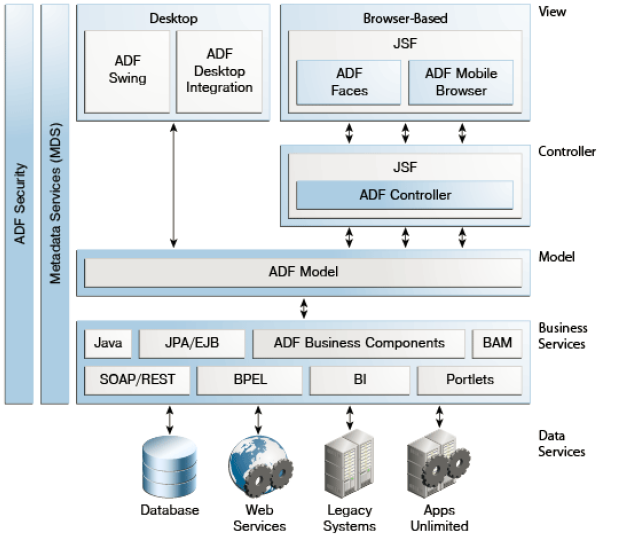
Applications built with the best practices using the Fusion web technology stack acheive a clean seperation of business logic, page navigation, and user interface by adhering to a Model-View-Controller architecture.


  • The model layer represents the data values related to the current page, along with the model-level business rules, security and application logic used against the data values.
  • The view layer contains the UI pages used to view or modify that data.
  • The controller layer processes the user input and determines page navigation.
  • The business service layer handles data access and encapsulates the business logic.
The other modules that make up for Fusion web application technology stack are :

  1. ADF Business Components: which simplify building the business services. 
  2. ADF Faces: which offers a rich library of ajax-enabled UI components for web applications built with JSFs.
  3. ADF Controller: Which integrates JSF with ADF Model, ADF Controller extends the standard JSF controller by providing additional functionality, such as resuable task-flows that pass control not only between the JSF pages, but also between other activities, for instance method calls or other task flows. The ADF Controller also works with the data model to ensure the proper data is used for each request or region.


Source : Developers Guide

Tuesday, December 30, 2014

Optmizing View Object Run time performance

Fetch Tuning ParametersUsage
Fetch Mode
The default fetch option is the All Rows option, which will be retrieved As Needed (FetchMode="FETCH_AS_NEEDED") or All at Once (FetchMode="FETCH_ALL"), depending on which option is desired. The As Needed option ensures that anexecuteQuery() operation on the view object initially retrieves only as many rows as necessary to fill the first page of a display, whose number of rows is set based on the view object's range size.
Fetch Size
In conjunction with the Fetch Mode option, the in Batches of field controls the number of records fetched at one time from the database (FetchSize in the view object XML). The default value is 1, which will give poor performance unless only one row will be fetched. The suggested configuration is to set this value to n+1 where n is the number of rows to be displayed in the user interface.
Max Fetch Size
The default max fetch size for a view object is -1, which means that there is no limit to the number of rows the view object can fetch. In cases where the result set should contain only n rows of data, the option Only up to row number should be selected and set to n. The developer can alternatively call setMaxFetchSize(n) to set this programmatically or manually add the parameter MaxFetchSize to the view object XML.
For view objects whose WHERE clause expects to retrieve a single row, set the option At Most One Row. This way the view object knows you don't expect any more rows and it will skip its normal test for that situation.
As mentioned earlier, setting a maximum fetch size of 0 (zero) makes the view object insert-only. In this case, no select query will be issued, so no rows will be fetched.
When you want to specify a global threshold for all view object queries in the application, you can configure the Row Fetch Limit property in the adf-config.xml file. Setting this property means you can avoid changing the Max Fetch Size for individual query operations. If you do specify a fetch limit for individual view objects, the Row Fetch Limit setting will be ignored in those cases. For more details about Row Fetch Limit, see Section 42.1.1, "Limiting the View Object Max Fetch Size to Fetch the First n Rows."
Forward-only Mode
If a data set will only be traversed going forward, then forward-only mode can help performance when iterating through the data set. This can be configured by programmatically calling setForwardOnly(true) on the view object. Setting forward-only will also prevent caching previous sets of rows as the data set is traversed.
When you tune view objects, you should also consider these issues:
  • Large data sets: View objects provide a mechanism to page through large data sets such that a user can jump to a specific page in the results. This is configured by calling setRangeSize(n) followed by setAccessMode(RowSet.RANGE_PAGING) on the view object where n is the number of rows contained within one page. When the user navigates to a specific page in the data set, the application can call scrollToRangePage(P) on the view object to navigate to page P. Range paging fetches and caches only the current page of rows in the view object row cache at the cost of another query execution to retrieve each page of data. Range paging is not appropriate where it is beneficial to have all fetched rows in the view object row cache (for example, when the application needs to read all rows in a dataset for an LOV or page back and forth in records of a small data set.
  • Spillover: There is a facility to use the data source as "virtual memory" when the JVM container runs out of memory. By default, this is disabled and can be turned on as a last resort by setting jbo.use.pers.coll=true. Enabling spillover can have a large performance impact.
  • SQL platform: If the generic SQL92 SQL platform is used to connect to generic SQL92-compliant databases, then some view object tuning options will not function correctly. The parameter that choosing the generic SQL92 SQL platform affects the most is the fetch size. When SQL92 SQL platform is used, the fetch size defaults to 10 rows regardless of what is configured for the view object. You can set the SQL platform when you define the database connection or you can define it as global project setting in the adf-config.xml file. By default, the SQL platform will beOracle. To manually override the SQL platform, you can also pass the parameter -Djbo.SQLBuilder="SQL92" to the JVM upon startup.
Additionally, you have some options to tune the view objects' associated SQL for better database performance:
  • Bind variables: If the query associated with the view object contains values that may change from execution to execution, use bind variables. Using bind variables in the query allows the query to reexecute without needing to reparse the query on the database. You can add bind variables to the view object in the Query page of the overview editor for the view object. For more information, see Section 5.10, "Working with Bind Variables."
  • Query optimizer hints: The view object can pass hints to the database to influence which execution plan to use for the associated query. The optimizer hints can be specified in the Retrieve from the Database group box in the Tuning section of the overview editor for the view object. For information about optimizer hints, see Section 42.2.4.3, "Specify a Query Optimizer Hint if Necessary."
Reference : http://docs.oracle.com/cd/E16162_01/web.1112/e16182/bcqueryresults.htm#ADFFD19565

Monday, November 10, 2014

Monday, September 22, 2014

Code Corner ADF Examples

http://www.oracle.com/technetwork/developer-tools/adf/learnmore/index-101235.html#CodeCornerSamples

Tuesday, September 9, 2014

Wednesday, August 13, 2014

Problem not fetching all the records when executing a View Object in ADF

Execute the View Object :

this.getXyzEOView().getViewObject().setQueryMode(ViewObjectImpl.QUERY_MODE_SCAN_DATABASE_TABLES|ViewObjectImpl.QUERY_MODE_SCAN_ENTITY_ROWS|ViewObjectImpl.QUERY_MODE_SCAN_UNPOSTED_ENTITY_ROWS|ViewObjectImpl.QUERY_MODE_SCAN_VIEW_ROWS);

Thursday, July 17, 2014

Run the page after rebuilt in adf

Replace the target in the jdeveloper properties with the below line:


C:\Oracle\Middleware-New\jdeveloper\jdeveloper.exe -J-Doracle.jdeveloper.adrs.incr.buildMonitor=false

Monday, June 16, 2014

ADF Best Practices

ADF Best Practices:
1.        Avoid Web services -- performance issues.
2.        Avoid JDBC Raw calls – framework already takes care of that
3.        Resource bundles – Error messages, tooltips and labels
4.        UI Properties files – File of tokens and matching strings
5.        Clean check out – everytime when starting a development
6.        One to Many mapping of EO s and VO s – Using joins in VO s is preferable
7.        Use ROVO when possible – Helps performance by bypassing the entity cache
8.        Define VO s at design time rather than at run time – VO s created at run time will incur an overhead in the performance
9.        Use named bind variables in queries to filter the data based on a number of parameters – Can use executeWithParams as a search form
10.     Performance – Define how many and what matter the rows are being fetched
                        Optimizer hints
                        Define the query plan the DB will use when executing a query

                            
11.     Application Module Configuration setting:

a.        While Developing : ‘jbo.ampool.doampooling’ parameter to ‘false’
As you exit out your application while testing, re-runs of the application wont be locked by the application you just exited.
b.        While Testing : ‘jbo.dofailover’ parameter to ‘false’
Thus disabling application fail over. This will allow application with out having to save the failover information.
c.        If the application uses the same database user to access application data ensure that you are not running with dynamic JDBC credentials. Use ‘jbo.ampool.dynamicjdbccredentials’ set to ‘false’

12.     Java Server Faces:
Do not mix JSFs with any other raw HTML tables for layout.

13.     Backing Beans:
The backing bean is a one-stop-shop for the code associated with a web page and generally speaking it is good practice,  if you require code to support a page, to have one backing bean per page.

14.     Managed Beans:

If it is required to store the state information to be held for the user interface then this should be done through managed beans.ADF Best Practices:
1.        Avoid Web services -- performance issues.
2.        Avoid JDBC Raw calls – framework already takes care of that
3.        Resource bundles – Error messages, tooltips and labels
4.        UI Properties files – File of tokens and matching strings
5.        Clean check out – everytime when starting a development
6.        One to Many mapping of EO s and VO s – Using joins in VO s is preferable
7.        Use ROVO when possible – Helps performance by bypassing the entity cache
8.        Define VO s at design time rather than at run time – VO s created at run time will incur an overhead in the performance
9.        Use named bind variables in queries to filter the data based on a number of parameters – Can use executeWithParams as a search form
10.     Performance – Define how many and what matter the rows are being fetched
                           Optimizer hints
                               Define the query plan the DB will use when executing a query
                            
11.     Application Module Configuration setting:
a.        While Developing : ‘jbo.ampool.doampooling’ parameter to ‘false’
As you exit out your application while testing, re-runs of the application wont be locked by the application you just exited.
b.        While Testing : ‘jbo.dofailover’ parameter to ‘false’
Thus disabling application fail over. This will allow application with out having to save the failover information.
c.        If the application uses the same database user to access application data ensure that you are not running with dynamic JDBC credentials. Use ‘jbo.ampool.dynamicjdbccredentials’ set to ‘false’

12.     Java Server Faces:
Do not mix JSFs with any other raw HTML tables for layout.

13.     Backing Beans:
The backing bean is a one-stop-shop for the code associated with a web page and generally speaking it is good practice,  if you require code to support a page, to have one backing bean per page.

14.     Managed Beans:
If it is required to store the state information to be held for the user interface then this should be done through managed beans.

Thursday, May 15, 2014

Refresh Page in ADF

The following code refreshes the whole page

  1. FacesContext fctx = FacesContext.getCurrentInstance();
    String refreshpage = fctx.getViewRoot().getViewId();ViewHandler ViewH = fctx.getApplication().getViewHandler();
    UIViewRoot UIV = ViewH.createView(fctx, refreshpage);
    UIV.setViewId(refreshpage);
    fctx.setViewRoot(UIV);

To refresh a specific component :

  1. AdfFacesContext.getCurrentInstance().addPartialTarget(UIComponent);

Friday, May 9, 2014

Web Service Proxy in adf

Requirement : Create a web service proxy and use that to invoke the web service and get the response.

As per my understanding web service proxy created java classes that can be used to invoke the web service from the application.

Creating a web service proxy is pretty simple, we just need to have the wsdl url.

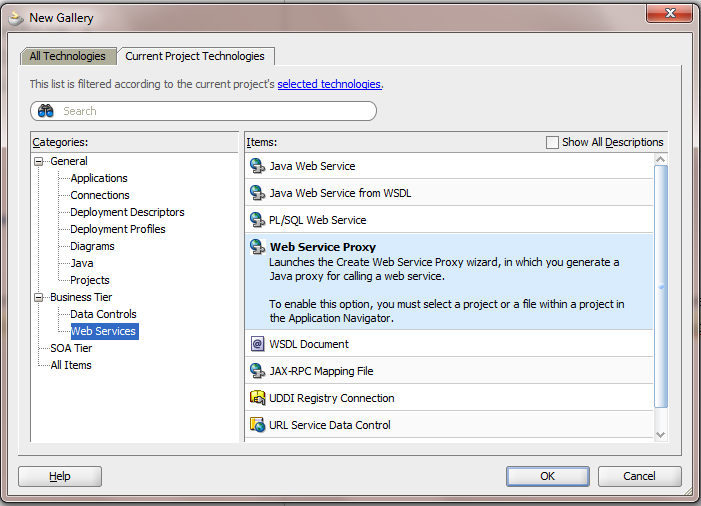
On 11.1.1.5.0 the options would be something like this:


select web service proxy

On 11.1.2.0


Now we need to select the different options in the wizard:

NOTE :  The Client style is usually JAX-WS Style but sometimes when invoking a .net service or any other legacy services we might encounter an error whil creating the web service. 

That case we might want to create a JAX-RPC weblogic style. 

In my case i had a .net service which i wasnt even able to test it in SOAPUI. This case go for JAX-RPC which will serve the purpose.

Please be informed that you can see these style selections only when we create a generic application with the web services shuffled in the project technologies, then you would see this option 

This new application can be used as a jar in the working application/project where you want to use the service.

For a regular SOA service we dont have to worry about all this. 

After successfully creating a Web Service Proxy we can see various .java files created. We have to search for class ending in *client.java class where you have the comments 

// add your code here 

Once we are aware of the input types pass the request and get the response here. 

If the request has to be sent from a different application, we need to add this application in the dependencies and class paths as a .jar file


Wednesday, May 7, 2014

Usage Of Servlets in ADF To Show Af:Image Based On a Parameter

Requirement : Show a Picture based on an Id which is coming from a service.

Solution : Create a Servlet in ViewController


Select appropriate methods to implement from doGet(), doPost(), service(), doPut(), doDelete().

In my case i had to implement the doGet() method to get the response from the servlet and show that on the jsff page.

The URL pattern will let you point to the appropriate Servlet from the page.

A java class something like this will get generated:

package client;

import java.io.IOException;
import java.io.PrintWriter;

import javax.servlet.*;
import javax.servlet.http.*;

public class Servlet1
  extends HttpServlet
{
  private static final String CONTENT_TYPE = "text/html; charset=windows-1252";

  public void init(ServletConfig config)
    throws ServletException
  {
    super.init(config);
  }

  public void doGet(HttpServletRequest request, HttpServletResponse response)
    throws ServletException, IOException
  {
    response.setContentType(CONTENT_TYPE);
    PrintWriter out = response.getWriter();
    out.println("<html>");
    out.println("<head><title>Servlet1</title></head>");
    out.println("<body>");
    out.println("<p>The servlet has received a GET. This is the reply.</p>");
    out.println("</body></html>");
    out.close();
  }
}

Override the doGet() method as per the requirement :
In my case i pass an Id to a service and get the byte[] in response to it.
I need to convert it to a jpg file, so set the content type to "image/jpg".
Write that to the out response of the doGet() and we are done defining and implementing the Servlet.

For Ex :

  public void doGet(HttpServletRequest request, HttpServletResponse response)
    throws ServletException, IOException
  {
    if (request.getParameter("dsId") != null)
    {
      OutputStream out = null;
      try
      {
        /*
          Code to get the Id from the service, added a jar file to the ViewController which has the webservice proxy client
          */
               }
        if (imageByte != null)
        {
          response.setContentType("image/jpg");
          out = response.getOutputStream();
          out.write(imageByte);
          out.flush();
        }
      }
      catch (Exception ex)
      {
        ex.printStackTrace();
      }
      finally
      {
        if (out != null)
          out.close();
      }
    }
  }
}

On the page where the image has to be showed on the run time give the appropriate Servlet URL

For Ex:

<af:image source="/dsimageservlet?dsId=#{bindings.DistributorId.inputValue}" id="i12"
                            inlineStyle="height:150px; width:150px;"/>

The newly added servlet can be view in web.xml file in my case the name is DSImageServlet.


Thats it, run the page and view the servlet response on the page.


Tuesday, April 29, 2014

Make, Rebuild and Make all option in JDeveloper

Make : Make operation compiles only the source files that have been changed since they were last compiled, or have dependencies that have been changed.

Rebuild : It compiles the source files unconditionally.

Make is done on individual source files, on working sets or on containers such as packages, projects, and workspaces.

Clean All: Cleans all the projects

Make all : Compiles not only the working project but all the projects.

Monday, April 28, 2014

Groovy Expression Usage in ADF, JDeveloper

Different points where Goovy code can be dropped:
1. Values for View and Entity objects attributes.
2. Validation rules on Entity object attributes.
3. Expressions for error messages.
4. Values for view object bind variables.
5. View object transient attribute validations.
Some of the properties of groovy scripting language

- Groovy is a scripting language having java like syntax
- Groovy is executed at run time
-  
Can be used in Entity and View objects in attribute validators(Entity Objects),attribute default values( Entity and View),bind variable default values ( View) place holder for error messages (EO validation rules)
- Define script expression validator or Compare validator 
- Error message tokens can be defined for handling validation failures 
- Conditional execution of validatiors are possible 
- Default value of bind variable in view object can be defined using groovy expression 
- Default value of view criteria 
- Default value and optional re-calculation condition for EO
- Value of transient for EO and VO 

Referencing Buisiness components objects in Groovy expression
Top level object is "adf" . Accessible ADF objects throgh groovy are 
- adf.context - Reference to ADFContext 
- adf.object - Equivalent to this operator in java.
- Entity Objects attributes - Reference methods and attributes of EntityImpl class.
- Entity Objects script validator rules - Attributes and method of ViewImpl class.
- View Object attributes 
- Bind Variable in view Object 
- Bind variable in view accessors 
- Transient attributes 
- adf.error 
- adf.userSession 
- adf.currentDate 
- adf.currentDateTime 
- Referencing custom buisiness components methods and attributes 
eg. Sal*12 - annualsalary .
PromotionDate>HireDate 

Method of entity class in validation rule.For validators use source keyword
eg. source.getDefaultSalaryForGrade()

- newValue - Attribute value being set 
-oldValue - current value of attribute being set 

if(Job=’SALESMAN’)
{
 return newValue<source.getMaxSalaryForGrade(Job)
}

Manipulating business component attribute values in a groovy expression
RowSet Objects
-          rowSetAttr.sum(GroovyExpr)
-          rowSetAttr.count(GroovyExpr)
-          rowSetAttr.avg(GroovyExpr)
-          rowSetAttr.min(GroovyExpr)
-          rowSetAttr.max(GroovyExpr)
EmployeesInDept.sum(“Sal+adf.object.getBenefitsValue(Job)”)